
Remove ChatGPT Formatting
Turn copied ChatGPT output into clean, predictable plain text for Word, Google Docs, email and CMS editors.
Open toolClean copied AI text for documents, code, CMSs and databases. Remove invisible characters, Markdown, unusual spacing and other copy-and-paste artifacts from ChatGPT, Claude, Gemini and Grok output.
Paste text to see a transparent report.
Highlighted labels show unusual or transformed characters at their original positions.
Process DOCX, TXT, Markdown, HTML and CSV locally; keep DOCX structure, images and basic formatting; download one ZIP plus a file-level JSON report without document text.
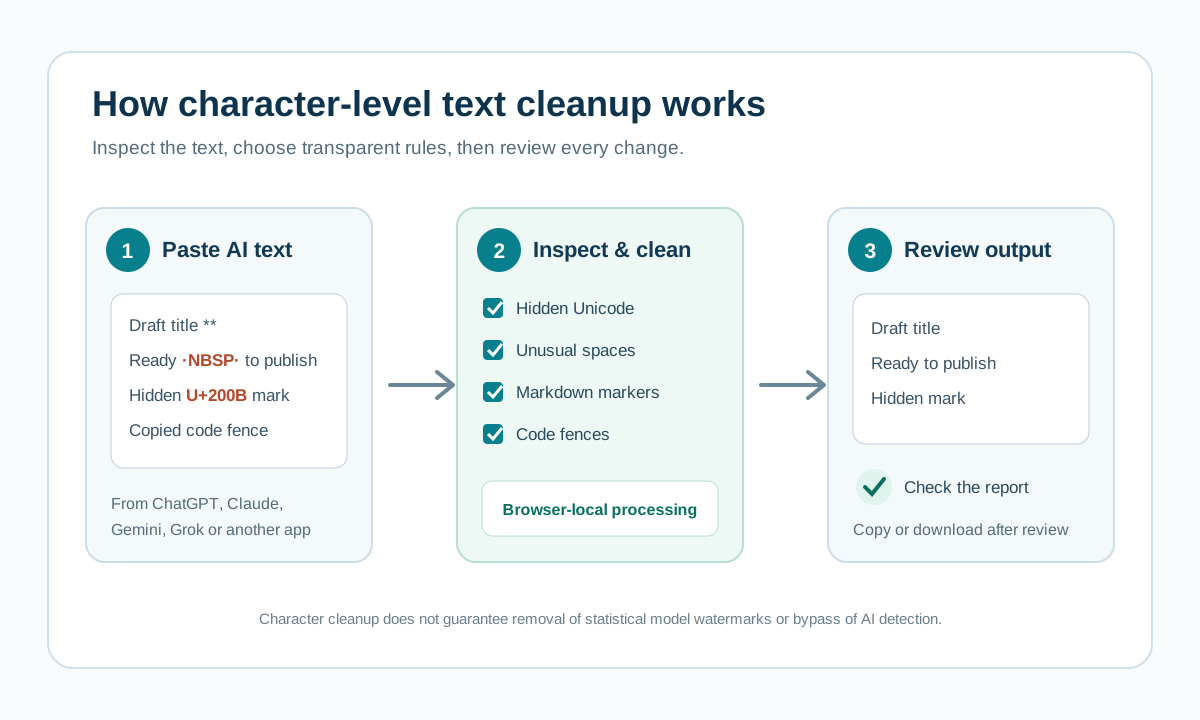
The diagram follows the complete workflow: paste text copied from ChatGPT, Claude, Gemini or Grok; inspect hidden Unicode and formatting; enable only the cleanup rules you need; then review the reported changes before copying the result.
This method removes inspectable character-level artifacts. It does not claim to remove a statistical model watermark or guarantee bypass text watermarking.
Turn copied ChatGPT output into clean, predictable plain text for Word, Google Docs, email and CMS editors.
Open toolDetect and remove hidden Unicode characters that can break search, validation, code and copy-paste workflows.
Open toolStrip zero-width spaces and word-joiner markers while leaving visible punctuation, spacing and language shaping joiners unchanged.
Open toolConvert Markdown from ChatGPT, Gemini, documentation or notes into clean plain text.
Open toolReplace em dashes and en dashes with simple hyphens for systems or style guides that require ASCII punctuation.
Open toolChange curly quotation marks and apostrophes into straight quotes for code, CSV and compatibility-sensitive text.
Open toolNormalize NBSP and other Unicode spacing characters into ordinary spaces.
Open toolRemove HTML, Markdown and irregular whitespace to create portable text for forms, email and databases.
Open toolReveal invisible and unusual Unicode code points with positions, names and a readable annotated preview.
Open toolChatGPT, Claude, Gemini and Grok all produce text that may carry Markdown, unusual Unicode spacing or clipboard formatting into the next application. This text cleaner finds and changes those inspectable artifacts locally with a transparent report.
Robotic tone and generic ideas are semantic writing problems. Our style checker reports specific patterns without pretending to prove whether a human or model wrote the text.
Read the methodologyStart with a broad cleanup pass, then disable rules that your text needs to preserve.
Clean Markdown, code fences, smart punctuation and spaces before pasting into Word, Docs, email, code or a CMS.
See code points and affected positions instead of accepting unexplained changes from any platform.
Open several TXT, Markdown, HTML or CSV files and process them in the browser.
“Text watermark” can describe several different things: hidden Unicode characters, rich-text and Markdown residues, clipboard formatting, or a model-level statistical signal. They have different causes and require different responses. A browser text cleaner can inspect and remove character-level artifacts; it cannot prove who wrote a passage or reliably remove a distributed model-level watermark.
Copied responses often carry Markdown, code fences, smart punctuation and spacing that may not fit a CMS, form or source file. Review the change report before pasting.
Long-form responses can include structured headings, lists and Unicode punctuation. Preserve the structure you need, then remove only the formatting that conflicts with its destination.
Text moved between web apps can pick up non-breaking spaces, line-break differences or rich clipboard content. Inspect the exact characters when search, layout or validation behaves unexpectedly.
As with any chat interface, copied output can combine visible prose with formatting conventions from the source UI. Use local cleanup to make the transfer predictable, not to make authorship claims.
A zero-width character can make two strings look identical while failing an exact search, duplicate check or validation rule.
Non-breaking spaces, Markdown remnants and mixed line endings can change wrapping, headings, lists and copy quality after publishing.
Smart quotes, invisible controls and copied code fences can break JSON, commands, CSV imports and identifiers even when the text looks normal.
CMS paste: remove visible Markdown markers and non-breaking spaces before publishing an AI-assisted draft.
Broken search: inspect a product name or quote that looks correct but does not match, then remove the hidden code point causing the difference.
Code handoff: strip code fences and smart quotes from an example before moving it into a repository or terminal.
Natural writing comes from concrete thought and purposeful editing, not from mechanically replacing a few punctuation marks.
Read guideA safe Markdown conversion keeps link labels and code content instead of deleting everything between formatting markers.
Read guideAn em dash is normal punctuation. Frequency can be a style signal, but a single character cannot identify who wrote a passage.
Read guideNo. Cleaning, inspection, style analysis and basic file processing happen in your browser.
No. Invisible Unicode cleanup fixes technical text problems. It does not guarantee any AI-detector result or remove a model-level statistical watermark.
The cleaners work with text copied from ChatGPT, Claude, Gemini, Grok and other applications because they operate on characters and formatting rather than a private model API.
Use this tool to remove text watermark artifacts such as zero-width spaces, control characters and unusual Unicode spacing. It can help remove an invisible watermark from text when that watermark is a character-level artifact.
Some searches describe this as bypass text watermarking. This site only cleans visible formatting and inspectable Unicode characters; it does not claim to bypass AI detection or remove a statistical model watermark.